Compare the Market: Nobody’s lower priced for quality SMS Lowest Bulk SMS Prices Free Bulk SMS Software
Text Marketer News and Case Studies SMS Marketing Infographics Text Marketing Industry Commentary Text Marketing Campaign Watch SMS Marketing Ideas and Advice

Recurring Billing – Get invoiced automatically when your credits get low

Posted on July 25th, 2011 by Richard.


Categories: All Bulk SMS Account Documentation, Distributed SMS Articles, Ticker
Tags: , ,

We recognise that many users of the system don’t want to be fussed with the finance side of running their account but at the same time they don’t want to run out of credits.

We have therefore built in an ‘auto billing’ option in your account that simply generates an invoice and sends it to your finance department when the credits hit a certain level in your account – decided by you.

Here’s how it works

You set a credits level at which an invoice is generated and set how many text credits should be invoiced. You specify a name and email address to send the invoice to.
As soon as your account hits the credit level you’ve set, an invoice is generated and emailed. Once that invoice is paid the credits are automatically added and the reoccurring invoice trigger is reset.

Example:
If you send 5000 messages per month and know your accounts department take a month to pay invoices, then we would suggest setting your trigger limit at about 6000 which gives your accounts a month to pay the invoice and little extra to ensure you don’t run out!

How to set it up in your account

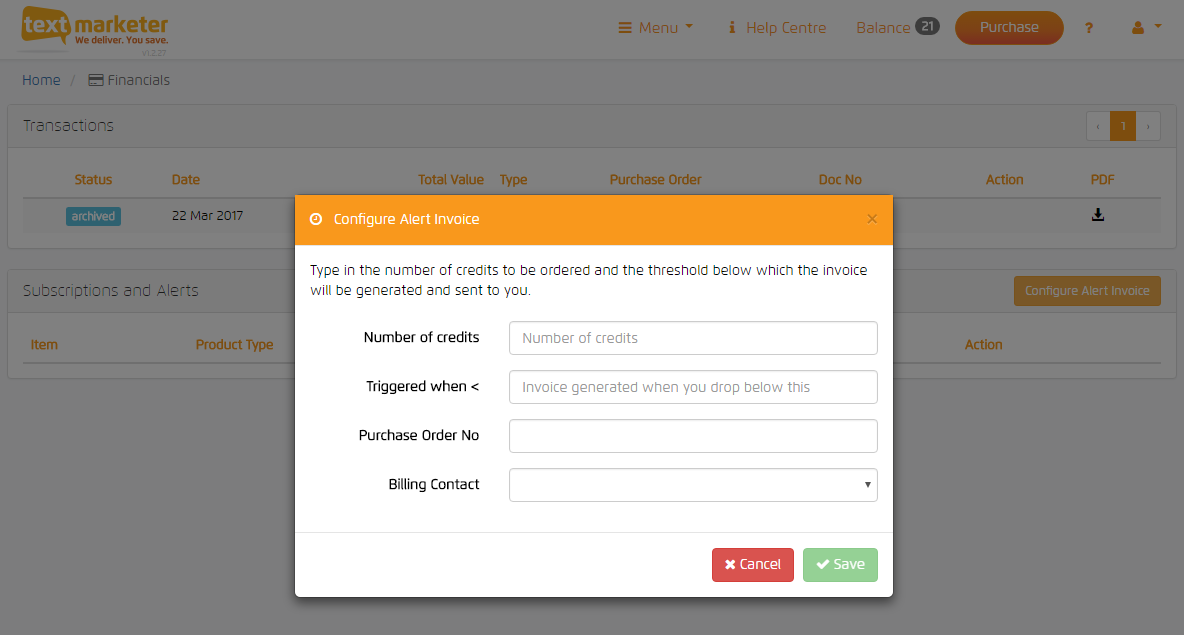
Go to Financial | Reoccurring invoices and you’ll see the screen below;

Credit Trigger = the level of credits in your account at which you want an invoice to be triggered
Credits Required = the amount of credits to invoice for (the minimum is 1,000)
Purchase Order No. = if applicable but optional
Select Billing Contact = if you have a contact in your account you can choose one from here otherwise simply complete the details below of the person to receive the invoices.

Press submit.

You’ll see the system is now set up and you can also edit the settings at any time.

Once one invoice has been triggered and sent the system will not send any further invoices until that one has been paid – payment of an invoice ‘resets the trigger’.

This setting does not affect your credits alert warning which can be set much lower as a fail safe back up in case the invoice hasn’t been paid.

Invoices generated in this way must be paid by BACS to the details on the invoice. There is no facility to pay triggered invoices by credit card. Should you wish to pay by card, please simply select pay by card in the payment options.


Popularity: 19%


Related posts:

  1. Buying SMS credits and payment processing
    Topping up your account with text credits. Download the PDF instruction manual for the main functions of the system How...
  2. How to transfer text credits from one account to another
    There are often times when it is convenient to have separate Text Marketer accounts within a company but it is...
  3. REST SMS Gateway API – credits resource
    This blog post has been superseded with our website documentation credits This document is referred to by the REST SMS Gateway API –...
  4. SMS Alert – Fancy a Free Butty?
    Tradespeople of Retford are being tempted into Travis Perkins by an sms alert offering the promise of a free butty. I...
  5. Cineworld Cinemas Choose Text Marketer
    In a competitive pitch, Cineworld Cinemas have selected Text Marketer as their bulk sms provider. The Cineworld Group, which has...
  6. Using the txtUs 2-way Text Messaging feature
    Using txtUs dedicated virtual mobile numbers for your business A txtUs number gives your business a dedicated virtual mobile number...
  7. 51 Per Cent of UK Mobile Owners Using M-commerce
    51 per cent of UK mobile owners aged 18 and over have used m-commerce, but only 8 per cent of...
  8. Text Marketer short code / txtUs API options
    Introduction The keyword on your system (on short code 88802) or your txtUs number can be used to “route” incoming...
  9. Create and Manage Text Marketer sub-accounts from an Administrator account
    IMPORTANT: These functions are not available by default. You need to contact us to request your account be made an...
  10. Sending to non-UK International numbers with Text Marketer
    Text Marketer accounts are set to send to UK mobile numbers only by default. But, you can enable your account...

Comments are closed.