
First Choice have partnered with Text Marketer to offer customers a low cost, high quality SMS route.
Integrating your RDB ProNet account with Text Marketer is very straightforward and should only take a few minutes. Stage one is to open up an account with Text Marketer. Make sure you use the promocode CHOICE and you’ll receive 100 free text credits for testing.
Once you’ve set up your account, simply follow the simple instructions below. Alternatively you can also call RDB support on 01256 314602.
Installing the Text Marketer Plugin
1. Copy the file TextMarketerOutbound.dll (found in the same folder as this document) into the Root of ProNet – normally C:\Program Files\First Choice Software\RDB ProNet or C:\Program Files (x86)\First Choice Software\RDB ProNet
2. Once the .dll file is in place, add the plugin into ProNet by navigating to Options -> User Preferences -> Plugins and clicking the Add button. You must type in the name as you would like the plugin to appear in the database. Then select the three dots at the right of the second box and select the file from its path: C:\Program Files\First Choice Software\RDB ProNet \TextMarketerOutbound.dll.
NOTE:
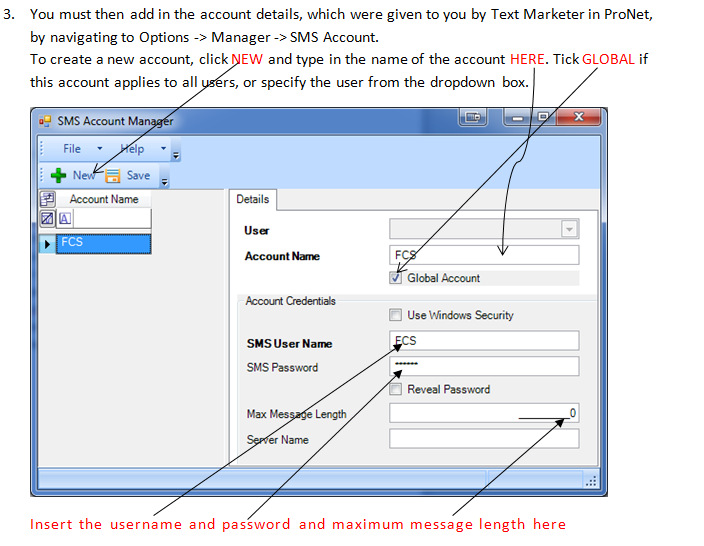
When creating the SMS account, if you have any previous accounts that are set as the global account you will need to remove the global account. Tick on the old account if you wish for the new one to be Global.
If you get a 403 forbidden error when testing the SMS service, check you have the correct account details. These can be found by logging into your Text Marketer account and going to Settings – API settings. Here you’ll find your API username and password displayed.
Setting the Reply Number / Company Name
The last step in the installation process is to create an entry in the SQL registry table using the script below to provide a reply number/company name on the message that is received by the recipient.
The text must be no more than 11 characters long and you need to input it into the ‘company name’ part of the script below. The script (in red) needs to be copied and pasted into the SQL Management Studio and run against the ProNet Database (if required support can do this part for you).
INSERT INTO [Registry] (
[SystemCode],
[RegistryUserId],
[XMLText],
[CreatedUserId],
[UpdatedUserId],
[CreatedOn],
[UpdatedOn]
) VALUES (
‘TEXTMARKETER_REPLY_NUMBER’,
NULL,
‘CompanyName’, <—Use the reply number here CANNOT BE LONGER THAN 11 CHARACTERS
1,
1,
GETDATE(),
GETDATE())
If you have any integration queries, RDB support will be delighted to help. You can reach them on 01256 314602.